AI Marketing Tools: A Practical Guide for Smarter Campaigns

Choosing AI Marketing Tools is a lot like picking the right saw for a remodel. The fanciest one is not always the best fit. The right tool is the one that saves time, matches the job, and does not leave extra cleanup behind.
For U.S. teams, these tools are now part of everyday marketing work. They help with copy, ads, images, reports, and campaign tracking. They also cut down on repetitive tasks that slow people down.
If you are a solo marketer, a small business owner, or part of a larger team, the goal is the same: do better work with less wasted effort. This guide shows where AI helps, where it falls short, and how to choose a tool that actually earns its place.
What AI Marketing Tools Actually Do
If you are asking, “What are AI Marketing Tools used for?” the short answer is simple. They help marketers draft, sort, test, and improve work faster.
These tools use machine learning and language models to support common marketing tasks. They do not replace strategy. They act more like a smart helper that can draft copy, suggest ideas, and spot patterns in data.
Here is a simple look at the most common types.
Tool type | Best use | Main benefit | Watch out for |
|---|---|---|---|
Copy assistants | Drafting ads, emails, and landing pages | Saves time on first drafts | Can drift from brand voice |
Image generators | Social posts, ad mockups, and banners | Speeds up creative testing | May need design cleanup |
Analytics helpers | Reading campaign data | Spots patterns faster | Still needs human judgment |
Automation tools | Routing leads and tasks | Cuts manual work | Setup can get messy |
Reporting tools | Summaries and client updates | Makes handoff easier | Numbers still need checking |
In plain English, AI marketing software helps with the parts of the job that are repetitive, time-consuming, or easy to overlook.
That usually includes:
Writing starter copy for ads and emails
Creating social captions for multiple platforms
Suggesting subject lines and headlines
Summarizing campaign results
Drafting reports for clients or managers
Finding weak spots in a campaign faster
If your team already uses our Text Tools category for polishing ad copy, AI can fit into that workflow without forcing a full rebuild.
Why More Teams Are Using Them Now
The reason is easy to understand. Marketing teams want to move faster without lowering quality.
A few years ago, many marketers spent a big part of the day on repetitive work. That meant writing the same email variations, the same social captions, or the same report summaries over and over. AI can handle a lot of that first-draft work.
Here is where teams usually notice the biggest gains.
Marketing task | AI helps? | Why it matters |
|---|---|---|
Email subject lines | Yes | Faster testing of open rates |
Social captions | Yes | More post ideas in less time |
Ad variations | Yes | Easier A/B testing |
Landing page drafts | Partly | Good starting point, but needs review |
Monthly reports | Yes | Saves time on summaries |
The biggest win is not just speed. It is focus.
When AI handles the routine parts, marketers can spend more time on strategy, audience research, offers, and creative direction. That is where human skill still matters most.
It also helps new team members get up to speed. A junior marketer can ask the tool to explain a campaign idea, suggest a better headline, or draft a cleaner version of a message. That makes onboarding smoother.
Where AI Fits in a Real Marketing Workflow
AI works best when it is used at the right stage of the job. It is not a magic button. It is more like a helper that steps in at specific points.
Planning campaigns
This is where AI can help with brainstorming, naming, and early structure.
A marketer can ask for:
A starter campaign outline
A list of audience segments
A first draft of content themes
A few headline angles to test
This is useful when a campaign is still taking shape. It helps teams move from idea to action faster.
It also helps when you need to compare options quickly. Instead of staring at a blank page, you get a starting point you can shape into something useful.
Writing copy
This is the most common use case.
AI can suggest ad copy, email text, landing page sections, and social captions. That is helpful when you are building a campaign with many moving parts.
It is also useful when you need to work through a familiar pattern quickly. For example, if you have written ten product emails already, AI can help draft the eleventh without starting from zero.
If your team needs help tightening wording before publishing, our Text Tools category for faster editing and copy cleanup can support that step.
Still, the marketer should stay in charge. AI can speed up the first draft, but it should not make final decisions on its own.
Building visuals
Many campaigns need more than words. They need graphics, banners, and social images too.
AI can help generate creative ideas, suggest layout directions, and speed up mockups. That is useful when you need to test several ad concepts before spending too much time on design.
Teams that need quick mockups can pair these platforms with our Image Tools category for social graphics and ad creatives.
This is especially helpful for:
Social media posts
Display ads
Promo banners
Event graphics
Simple concept boards
The best results usually come when AI supports the creative process instead of trying to replace it.
Reporting and handoff
This is where many teams fall behind. The campaign runs, the numbers come in, but the summary never gets finished.
AI can help draft:
Campaign summaries
Performance notes
Client updates
Internal handoff documents
Basic next-step recommendations
That matters when a project changes hands or when a manager needs a quick read on what happened.
When it is time to share results with clients or leadership, our PDF Tools category for clean campaign reports can help package the final version in a neat format.
Automation and integrations
Some AI-powered marketing tools also connect with CRMs, ad platforms, and email systems. That can save a lot of manual work.
For example, a tool might:
Route leads to the right sales rep
Trigger a follow-up email after a form fill
Tag contacts based on behavior
Pull campaign data into a dashboard
If your stack needs custom triggers or data handoffs, our Developer Tools category for workflow integrations is worth a look.
Important note: if a tool touches customer data, check privacy settings before you roll it out. Security and compliance still matter.
How to Choose the Right Tool for Your Workflow
Choosing AI Marketing Tools should feel practical, not trendy. Start with your real needs, not the biggest marketing claim.
A good way to narrow the list is to ask these questions:
Question to ask | What to look for | Why it matters |
|---|---|---|
Does it fit our stack? | Editor, CRM, ad platform support | Less setup pain |
Does it protect data? | Privacy controls and retention rules | Keeps customer info safer |
Does it match our brand voice? | Tone settings and custom prompts | Better copy quality |
Does it help with more than one task? | Copy, tests, reports, or visuals | Better value |
Will the team use it? | Simple interface and clear output | Adoption matters |
If you are wondering, “Which AI marketing software is best for small teams?” the honest answer is this: the best one is the one that solves the most annoying problem first.
If your biggest pain is writing repetitive copy, start there. If your biggest pain is reporting, choose a tool that handles summaries better. If your biggest pain is campaign setup, look for automation support.
A simple rule works well here: choose the tool that removes the most friction from your day.
Common Mistakes to Avoid
AI tools can save time, but only if they are used with care. A few common mistakes show up again and again.
Trusting the output without review
Using vague prompts that leave too much room for error
Letting AI handle sensitive claims alone
Skipping tests because the copy “looks right”
Buying a tool that does not fit the team’s stack
Ignoring company rules for privacy and security
One important note: a tool that works well for a small side project may not be right for a full campaign. The stakes are different. So is the review process.
Another mistake is expecting one tool to do everything. Some AI content tools are great at writing. Others are better at analytics or automation. The best setup often uses a few tools that work well together.
Pros and Cons of AI Marketing Tools
Every useful tool has tradeoffs. AI is no different.
Pros | Why it helps | Cons | Why it matters |
|---|---|---|---|
Faster drafts | Saves time on routine work | Wrong answers happen | Human review is still needed |
Better consistency | Keeps tone and structure steady | Privacy concerns | Sensitive data needs care |
Easier testing | More ad and copy variations | Can create dependency | Skills still need to grow |
Faster reporting | Speeds up handoffs | Not a full strategist | People still make the final call |
The pros are real. So are the limits.
That is why the best teams use AI as a support tool, not as the final authority.
A Simple Buying Process That Works
If you want a low-risk way to choose AI Marketing Tools, start small.
Pick one real project.
Test the tool on a task your team already does often.
Measure how much time it saves.
Check whether the output needs heavy cleanup.
Ask the team if it actually feels helpful.
Decide whether to expand after the trial.
This approach keeps the decision grounded in real work. It also helps you avoid paying for features nobody uses.
A tool should earn its place. It should not just look good in a demo.
Real-Life Example
Imagine a family-owned remodeling company in Ohio that wants more leads for kitchen upgrades.
Before AI, the marketing person would have to write every ad, email, and social post by hand. That takes time, especially when the same message needs to be adjusted for different audiences.
With AI support, the team can:
Draft the first version of a Facebook ad
Generate subject lines for a follow-up email
Create a few headline options for a landing page
Write a first draft of the monthly report
Clean up the handoff notes for the sales team
The marketer still reviews everything. They still check the facts. They still make the final call.
But the campaign moves faster, and the team spends less time on repetitive work. That is the real value.
Expert Tips for Better Results
The best results usually come from teams that use AI with discipline.
Keep prompts specific and clear
Break large tasks into smaller requests
Review claims and numbers by hand
Save prompts that work well
Use AI for drafts, not final approval
Teach the team the same brand standards
If you want better output, give the tool better input. That simple habit makes a big difference.
Also, do not let the tool become a crutch. Marketers still need to understand the message, the audience, and the offer. AI can speed up the work, but it cannot replace judgment.
Key Points
AI Marketing Tools help with copy, visuals, reporting, and automation.
They are best for repetitive work and first drafts.
Human review is still necessary, especially for claims and data.
The right tool depends on your stack, privacy needs, and workflow.
Small teams should test before they buy.
Better prompts usually lead to better results.
For more practical updates and fresh tool ideas, visit the latest blog posts on new marketing workflows.
AI Marketing Tools are now a practical part of modern marketing work. They help U.S. teams move faster, reduce repetitive tasks, and keep campaigns organized. They can draft copy, suggest visuals, summarize results, and support automation without taking over the job of the marketer.
The best results come from a balanced approach. Let AI handle the routine work. Let people handle the strategy, judgment, and final review. That is how teams keep quality high while still saving time.
If you choose carefully and use these tools with clear standards, they can become a steady part of your workflow for years to come.
Related posts

Droven.io AI for Business: A Complete Guide to Smarter Business Growth with Artificial Intelligence
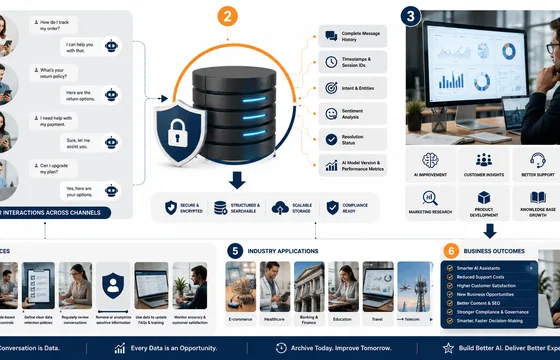
AI Chatbot Conversations Archive: Why It Matters in 2026
As conversational AI continues to evolve, businesses that invest in structured conversation archiving will be better equipped to understand their customers, optimize operations, and maintain a competitive advantage in an increasingly AI-driven world
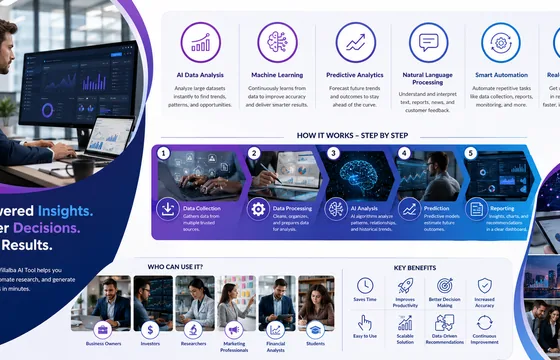
Abraham Quiros Villalba AI Tool: Features, Benefits, Use Cases & Everything You Need to Know (2026)
The Abraham Quiros Villalba AI Tool is an AI-powered platform designed to help users analyze complex data, automate research, and generate intelligent insights. It uses modern artificial intelligence technologies such as machine learning, predictive analytics, and natural language processing (NLP) to simplify decision-making across various industries.

AI Transformation Is a Problem of Governance, Not Just Technology
By treating AI transformation as a governance challenge rather than simply a technical upgrade, businesses can reduce risk, improve trust, ensure regulatory compliance, and create sustainable value. In an era where AI increasingly influences critical decisions, strong governance is no longer optional—it is the foundation of successful AI transformation.

AI Development Tools: A Practical Guide for U.S. Teams
Picking AI Development Tools is a lot like choosing tools for a kitchen remodel. The fanciest drill is not always the best one for the job. The same is true in software. A tool that looks impressive in a demo may feel clumsy once real work starts. The best choice is the one that fits your stack, your team, and your security rules.