Wolf3D Software: The Company Behind Ready Player Me’s 3D Avatars
If you’ve spent any time in VR chat rooms, metaverse apps, or games that let you build a custom digital avatar from a selfie, there’s a good chance you’ve used technology built by a company called Wolf3D. It’s a name that doesn’t come up as often today because the company rebranded years ago, but its software shaped how a huge number of games and apps handle personalized 3D avatars. Here’s the full story of what Wolf3D software actually was, how it evolved, and where things stand now.
From 3D Scanning Booths to Selfie-Based Avatars
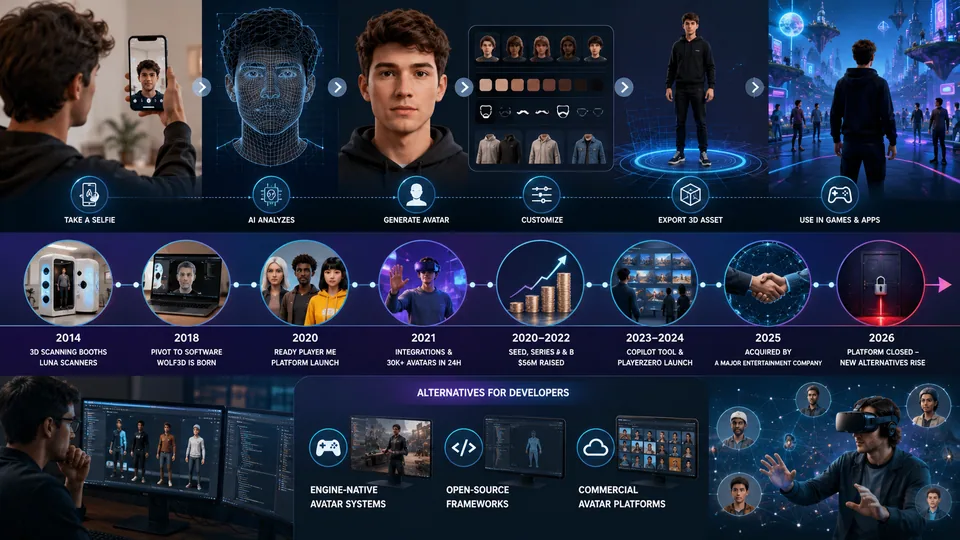
Wolf3D didn’t start out as a software company at all. It began in 2014 in Tallinn, Estonia, under the name Wolfprint 3D, founded by Timmu Tõke, Kaspar Tiri, Rainer Selvet, and Haver Järveoja. The original idea was much more physical than digital: the company built 3D scanning booths, called Luna scanners, that could capture a person’s face in about 90 seconds. These booths were installed in malls and airports, letting people walk in, get scanned, and walk out with a realistic 3D avatar.
By late 2018, the company pivoted away from physical scanning hardware and shortened its name to Wolf3D. Instead of scanning booths, the team shifted to software that could generate a full 3D avatar from a single 2D photograph, using machine learning trained on tens of thousands of facial scans collected during the earlier scanning-booth phase. That shift from hardware to pure software is really where “Wolf3D software” as most people know it began.
The Launch of Ready Player Me
In 2020, Wolf3D introduced a new avatar platform called Ready Player Me, giving game and app developers plug-and-play tools to add customizable 3D avatars to their own products without building the technology from scratch. The name itself was a nod to the novel Ready Player One, reflecting the idea that a person’s digital avatar should follow them across different virtual worlds instead of being locked to a single game or platform.
The platform grew quickly. Early integrations included social VR apps like VRChat, and Wolf3D built avatar systems for major brands including Huawei, H&M, TCL, and NTT DoCoMo. When VRChat officially launched Ready Player Me support in early 2021, the community created more than 30,000 avatars within the first 24 hours, briefly overwhelming the company’s servers.
How the Avatar Creation Process Actually Works
For anyone who’s used Ready Player Me, the process is refreshingly simple, and it’s worth breaking down because it explains why the underlying software was such a big deal for developers:
The user uploads a selfie or takes a photo directly through the browser or app.
Wolf3D’s machine learning model analyzes the photo and generates a base 3D avatar that resembles the person.
The user can then customize skin tone, hairstyle, facial hair, eyewear, and outfits from a library of preset options.
The finished avatar gets exported as a portable 3D asset that can be dropped into any supported game or app.
For developers, this solved a real headache. Building a custom avatar creation system from scratch takes significant time and 3D art resources. Wolf3D’s software let studios integrate a working avatar system in a matter of days instead of months, freeing up their teams to focus on the actual game or app instead of avatar infrastructure.
Funding Growth and Industry Traction
Wolf3D’s shift to software paid off in terms of investor interest. The company raised a $1.3 million seed round in August 2020, followed by a $13 million Series A in December 2021 led by Taavet+Sten, with participation from GitHub co-founder Tom Preston-Werner and Samsung Next, among others. By August 2022, the company had raised a $56 million Series B round led by Andreessen Horowitz, with backing from Roblox co-founder David Baszucki and Twitch co-founder Justin Kan.
Somewhere along this growth path, the company officially rebranded from Wolf3D to Ready Player Me, matching its name to the product that had become its primary identity in the market.
What Happened to Wolf3D and Ready Player Me
The company continued expanding its platform over the following years, including launching an AI-based Copilot tool to help developers streamline avatar integration, and later a gaming platform called PlayerZero focused on Web3 collectible avatars. In 2025, Ready Player Me — the company formerly known as Wolf3D — was acquired by Netflix.
More recently, reports from early 2026 indicate that the ReadyPlayer.me platform has closed, leaving developers who built on top of it looking for alternative avatar solutions. If you’re a developer who previously relied on Wolf3D or Ready Player Me’s avatar tools, it’s worth checking the latest official announcements directly, since platform status and available alternatives can change quickly in this space.
Alternatives Worth Knowing About
If you’re building a project that needs customizable 3D avatars and are researching options following changes to the Ready Player Me platform, a few categories of alternatives are worth exploring:
Game engine-native avatar systems built directly into Unity or Unreal Engine asset stores
Open-source avatar frameworks, which give more control but require more development work
Other commercial avatar-as-a-service platforms that have emerged as competitors over the past few years
Whichever direction you go, it’s worth testing integration time, licensing terms, and export compatibility with your specific game engine before committing a project to any single avatar platform.
Why This Story Matters for Developers
The Wolf3D story is a useful case study for anyone building software in a fast-moving space like the metaverse or 3D avatar tools. A hardware-first idea pivoted into a software product, found real traction by solving a genuine developer pain point, and eventually became valuable enough to attract a major acquisition. It’s also a reminder that platforms you build on top of can shift quickly, so keeping your project’s assets portable and documentation organized is worth the extra effort.
If you’re managing documentation, licensing agreements, or technical specs for a project that depends on third-party platforms like this, keeping those files organized matters more than it might seem. A set of Developer Tools can help you manage code snippets and configuration files, while Image Tools are useful if you’re working with avatar textures, reference photos, or export assets that need resizing or format conversion. And if you’re drafting a technical writeup or comparison of avatar platforms for your team, cleaning up that document with Text Tools can save you some editing time before it goes out.
For more breakdowns of software companies, platforms, and tools like this one, check out the Toolsimpli Blog, and explore more resources at Toolsimpli.
Related posts

Recovery Home Management Software: What It Is and Why Your Facility Needs It
At its core, this type of software centralizes everything related to running a recovery home. Instead of keeping resident files in one place, payment records in another, and compliance documents in a folder on someone’s desktop, everything lives in one system your whole team can access.

Common Account Audit Software Used in Kenya: A Practical Overview
Before naming specific tools, it helps to understand the different categories, since most firms end up using more than one type together.

WhiteSnow Software: Who They Are and What They Actually Do
WhiteSnow Software is a real, established software consultancy with over a decade in the industry and a genuine product — Axonator — that it has continued to develop and support. Like any vendor, the right move is to verify current details directly with the company, request references, and compare their offering against your specific project needs rather than relying solely on any single source, including this one.
UART USB Software: A Practical Guide for Hobbyists and Engineers
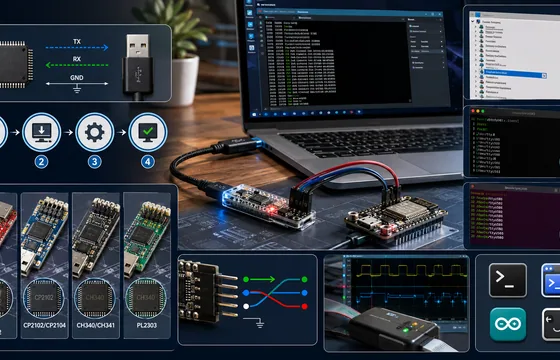
If you’ve installed the right driver, confirmed your wiring, and matched your baud rate, but you’re still getting garbage data, the problem might not be software at all. A cheap USB logic analyzer lets you actually see the electrical signal on the TX/RX lines, which is often the fastest way to catch wiring or timing issues that software troubleshooting alone won’t reveal.