AI Tier List: Ranking the Best AI Tools From S to D
New AI tools show up almost every week. Some are genuinely useful. Others fade fast once people try them for real work. That is where an AI tier list comes in handy.
A tier list sorts tools into simple groups, from S tier at the top down to D tier at the bottom. Instead of reading twenty reviews, you get a quick snapshot of what actually performs well and what does not hold up.
This guide breaks down an AI tier list by category, so you can find the right tool for writing, images, video, coding, or everyday productivity. We will also cover how these rankings get built, so you know what to look for the next time a "best AI tools" list crosses your feed.
Ranking tools this way also protects you from a common trap: mistaking a flashy demo for real-world performance. A polished promo video says very little about how a tool behaves when you throw a messy, real task at it. Tier lists built on actual testing cut through that noise.
What Is an AI Tier List and Why Does It Matter
A tier list is a ranking system that groups items by quality or performance instead of listing them in a plain top ten. The idea started in gaming communities, where players ranked characters by how strong they were in competitive play. It has since spread to almost anything people want to compare, including AI software.
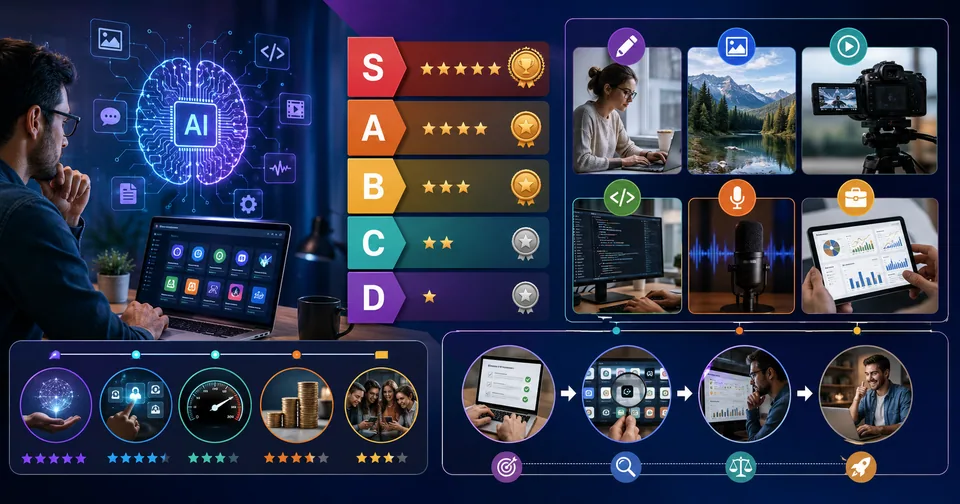
Most tier lists use five or six tiers:
S Tier: Best in class, few or no real weaknesses
A Tier: Very strong, minor limitations
B Tier: Solid and reliable, but not top of the field
C Tier: Usable, but with notable gaps
D Tier: Weak performance or better alternatives exist
An AI tier list matters because the AI market moves fast. A tool that topped the charts six months ago might already be behind. Ranking by tier, rather than by a single fixed list, gives a clearer picture of where a tool stands relative to its competition right now.
Tiers also make comparison easier when tools are not identical in purpose. A number-one spot on a "top ten" list implies one tool beats every other tool at everything, which is rarely true. A tier system is more honest about it. Several tools can share S tier because they excel in different ways, while still giving you a fast read on which options are worth your time and which ones you can skip.
There is also a practical reason tier lists have become so common in the AI space specifically. Traditional software reviews often took months to update. AI tools change their underlying models, pricing, and features on a rolling basis, sometimes multiple times in a single quarter. A tier format is easier to revise quickly, since moving a tool up or down a tier takes less rework than rewriting an entire ranked article from scratch.
How AI Tools Get Ranked Into Tiers
Good rankings are not just opinions. They usually come from testing tools against a consistent set of criteria. Here is what typically goes into the process.
Output Quality
This is the core test. Does the tool produce accurate, useful, well-formatted results, or does it need heavy editing afterward? For writing tools, this means checking grammar, tone, and factual accuracy. For image and video tools, it means checking realism, detail, and consistency.
Ease of Use
A powerful tool that takes hours to learn will lose points against a simpler one that gets the job done in minutes. Interface design, onboarding, and available templates all factor into this score.
Speed and Reliability
Slow load times, frequent errors, or inconsistent output quality drag a tool down the rankings, even if its best results are impressive.
Value for Money
Free tools and paid tools get compared within their own price bracket first, then against each other. A tool priced high needs to justify that cost with clearly better output or features.
Community Feedback
Reviews, forum discussions, and user ratings help confirm whether a tool performs the same way for everyday users as it does in a controlled test. A tool that scores well in a lab setting but draws consistent complaints online is usually flagged, since real usage patterns tend to expose issues that a short test might miss.
Update Frequency
How often a tool ships improvements also factors into its ranking. A tool that has not meaningfully updated in a year is more likely to slip in tier, even if it was strong when it launched, simply because competitors keep closing the gap.
Why No Ranking Is Perfect
It is worth remembering that every tier list reflects the testing conditions behind it. A tool that performs well for short, simple prompts might rank differently than a tool tested against long, complex tasks. That is one reason it helps to check a couple of different sources rather than relying on a single list, especially for a tool you plan to use daily or pay for on a subscription.
Below is a simple breakdown of how these factors typically get weighted.
Criteria | What It Measures | Typical Weight |
|---|---|---|
Output Quality | Accuracy and usefulness of results | 35% |
Ease of Use | Learning curve and interface design | 20% |
Speed and Reliability | Uptime and consistency | 15% |
Value for Money | Cost versus features | 20% |
Community Feedback | Real-world user satisfaction | 10% |
AI Tier List by Category
Different AI tools serve very different purposes, so a single ranking rarely tells the full story. Breaking things down by category gives a more useful picture.
Writing and Content Tools
Writing tools are judged on grammar accuracy, tone flexibility, and how natural the final text reads. S-tier writing tools handle long-form content, adjust tone on request, and rarely produce robotic phrasing. Lower-tier tools tend to repeat phrases, lose context in longer pieces, or need constant rewriting.
If your workflow involves drafting blog posts, product descriptions, or marketing copy, look for a tool that supports multiple tones and can maintain context across a full article rather than just a paragraph. It also helps to check how a tool handles research-heavy topics. Some writing assistants are excellent at casual, conversational copy but struggle once a piece requires specific facts, statistics, or technical accuracy.
Another factor worth checking is editing support. Some writing tools only generate a first draft, while stronger ones can revise based on feedback, adjust length on request, or restructure a piece without losing the original point. That editing flexibility often separates a merely good writing tool from a genuinely useful one.
Image Generation Tools
Image tools are ranked on detail, consistency between generations, and how well they follow specific prompts. Top-tier image generators can maintain a consistent art style across multiple images and handle detailed prompts like lighting, camera angle, or texture. Weaker tools often produce distorted hands, inconsistent faces, or ignore parts of a prompt entirely.
Consistency across a batch matters more than most people expect. If you need ten product images that all match in lighting and background style, a tool that nails one great image but produces wildly different results on the next attempt is not a good fit, even if its best single output looks impressive. Editing support is another differentiator. Some tools let you adjust just one part of an image, like swapping a background, while others force you to regenerate the entire image and hope the rest stays close to what you had.
Video Generation Tools
Video generation is one of the newest and fastest-changing categories. Rankings here focus on motion smoothness, realism, and clip length. A year ago, most tools struggled to produce more than a few seconds of usable footage. Today, the gap between top and bottom tier tools is much wider, since some can now handle longer, more coherent scenes.
Physical accuracy is another common test point. Does an object stay the same shape as it moves? Does a person's face stay consistent from the first frame to the last? Lower-tier tools tend to fall apart in exactly these moments, with objects warping or details shifting partway through a clip. Sound and lip-sync support, when a tool offers it, adds another layer to the comparison, since matching audio to video convincingly is still one of the harder problems in this category.
Coding Assistants
Coding tools are tested on how often their suggestions actually run without errors, how well they understand context across a file, and how useful their explanations are. S-tier coding assistants catch bugs before they cause problems and explain their reasoning in plain language. Lower-tier tools tend to suggest code that looks right but fails on execution.
Context handling is especially important for this category. A tool that only looks at the current line of code will keep suggesting fixes that break something else in the file. Stronger tools track the surrounding project, catch naming conflicts, and flag when a suggested change might affect other parts of the code. For anyone working across multiple files or a larger project, this kind of broader awareness makes a noticeably bigger difference than raw suggestion speed.
Voice and Audio Tools
Voice tools are ranked mainly on how natural the output sounds and how well it handles pacing, emotion, and pronunciation. The best tools in this category are difficult to distinguish from a real human voice in short clips. Weaker ones sound flat or mispronounce uncommon words.
Longer scripts are where the real test happens. A tool can sound convincing for one sentence and then start to drift into an odd rhythm over a full paragraph. Ranking systems that test with longer sample scripts, rather than a single short clip, tend to give a more accurate picture of how a voice tool will actually perform for a full project like a podcast intro or a video voiceover.
Everyday Productivity Tools
Not every useful AI tool fits neatly into a creative category. File converters, document editors, spreadsheet helpers, and quick utility tools make up a large part of what people actually use day to day. These tools are ranked less on creativity and more on speed, accuracy, and how well they handle edge cases, like a file with an unusual format or a spreadsheet with messy formatting. A high-tier productivity tool gets the job done in one step without requiring cleanup afterward.
Common Mistakes People Make When Comparing AI Tools
Chasing Benchmarks Instead of Real Use
Benchmark scores look impressive, but they do not always reflect how a tool performs on everyday tasks. A model that tops a technical benchmark might still struggle with a simple, practical request. Real-world testing tells a more accurate story than a leaderboard number.
Ignoring the Learning Curve
A tool ranked highly for raw output can still be a poor fit if it takes weeks to learn. Time spent learning a complicated interface is time not spent on the actual task.
Overlooking Pricing Tiers
Some tools look expensive on the surface but include features that save hours of manual work. Others charge a premium for very little extra value. Compare pricing against what you would spend on comparable tools with similar output, rather than judging cost in isolation.
Assuming One Tool Fits Every Task
Most people need more than one AI tool. A writing assistant will not help with video editing, and an image generator will not write code. Building a small toolkit, rather than searching for a single do-everything tool, usually leads to better results.
Trusting a List With No Testing Behind It
Not every "best AI tools" page online is built from actual hands-on testing. Some are little more than a list of names with generic descriptions swapped in. A reliable tier list will usually explain its methodology, even briefly, so you can judge whether the ranking is based on real use or just copied from other lists.
Skipping the Free Trial
Even a tool that ranks well for most users might not fit your specific use case. Most AI tools offer some kind of free trial or limited free tier. Testing a tool yourself for a small task before committing to a paid plan is one of the simplest ways to avoid buyer's remorse.
How Often Do AI Tier Lists Change
AI tools update far more often than most software. A ranking that was accurate three months ago can already be outdated. Fast-moving categories, like writing and image generation, tend to shift the most since new models release every few weeks. Categories like voice tools change more slowly, since fewer companies are actively competing in that space right now.
For that reason, look for tier lists that mention a recent review date. A ranking published without any update history is less reliable than one that shows ongoing testing.
Price changes also affect rankings, sometimes as much as feature updates do. A tool that drops its price or adds a generous free tier can jump up a tier purely on value, even without changing its core performance. Watching for these shifts is especially useful if budget is a bigger factor for you than having access to the single most advanced tool available.
Finding the Right AI Tool for Your Workflow
Once you know where different tools rank, the next step is matching a tool to your actual workflow. A freelance writer and a marketing team will not need the same features, even if they are both looking at writing tools.
If you regularly work with PDFs, our PDF tools collection covers converting, merging, and editing documents without installing extra software.
For anyone handling product photos or graphics, the image tools page has options for resizing, converting, and cleaning up images quickly.
Writers who need quick formatting or word count checks can find what they need in the text tools section.
Developers looking for quick utilities like code formatters or converters can check out the developer tools collection.
For ongoing coverage of new AI releases and comparisons, the latest blogs page is updated regularly.
These smaller, task-specific tools are worth keeping in mind alongside the bigger, more general AI platforms covered earlier. A full AI writing assistant is useful for drafting long content, but a quick text tool might be a faster fit for a simple word count check or formatting cleanup. Matching the size of the tool to the size of the task saves time on both ends.
Below is a simple way to think through the decision.
Your Main Task | Look For | Skip Tools That |
|---|---|---|
Long-form writing | Tone control, context across pages | Lose track of earlier sections |
Product or marketing images | Style consistency, prompt accuracy | Distort faces or ignore details |
Short video clips | Motion smoothness, clip length | Cap out under a few seconds |
Code review or debugging | Context awareness, clear explanations | Suggest code that fails to run |
Voiceovers or narration | Natural pacing, pronunciation | Sound robotic on longer scripts |
Keeping Your Own Tier List Updated
Instead of relying only on published rankings, it helps to keep a short running list of your own. Note which tools consistently save you time and which ones you stop using after a week. Personal use patterns often reveal more than a general ranking, since your specific tasks may not match what a broad review covers.
A simple habit is to revisit your list every couple of months. Drop any tool you have not opened recently, and give newer releases in your category a quick trial run. This keeps your toolkit current without requiring a full research project every time a new AI tool launches.
It also helps to note the specific reason a tool earns its spot on your personal list. "Good for quick edits" or "reliable for long articles" is more useful to future you than a vague S or A rating with no context. When you revisit the list later, those small notes make it much faster to decide whether a tool still deserves its place or if something newer has quietly taken over that job.
The AI tools market will keep shifting, and today's S-tier pick may not hold that spot a year from now. Checking in on rankings occasionally, rather than picking one tool and sticking with it indefinitely, is the simplest way to make sure you are still using the best option for the job.