FastClaim Spectrum Mobile: How to File a Device Protection Claim
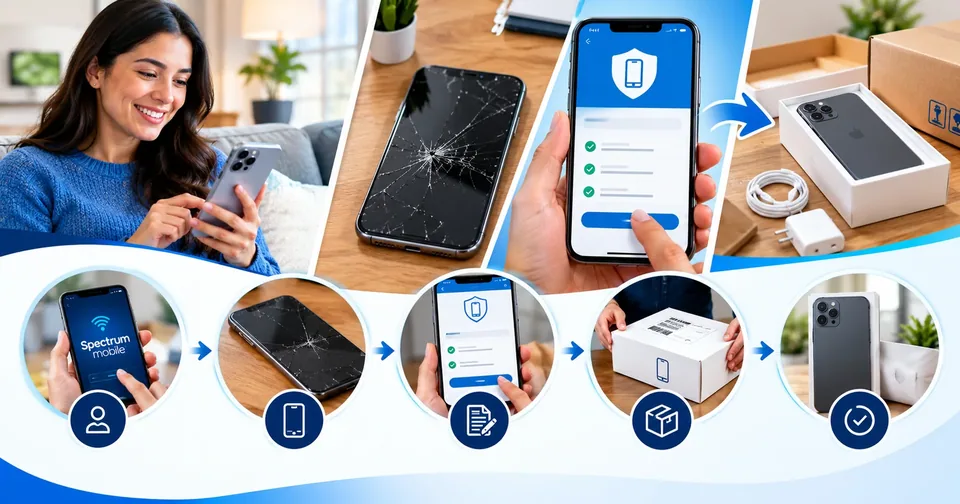
A cracked screen or a missing phone always seems to happen at the worst possible moment. If you signed up for device protection with Spectrum Mobile, the good news is that filing a claim is quick, and you can handle most of it from your couch. Claims run through a service called FastClaim, which is managed by Assurant, the company that backs Spectrum Mobile's protection plans. This guide walks you through how it works, what you'll actually pay, and the small details that trip people up.
What FastClaim Spectrum Mobile actually is
FastClaim is the online portal where Spectrum Mobile customers file device protection claims. You'll find it at fastclaim.com/spectrummobile. Spectrum doesn't handle these claims itself. It partners with Assurant, a large device-protection provider that also works with other carriers. So when you file, you're really dealing with Assurant behind the scenes, even though everything is branded for Spectrum Mobile.
That matters for one simple reason. If you call Spectrum's regular support line about a broken phone, they'll usually point you to FastClaim or the Assurant care team anyway. Going straight to the source saves you a step.
Know your plan before you file
Spectrum Mobile offers more than one level of protection, and what you can claim depends on which one you have. The lineup includes a standard Repair and Replacement Plan and a higher tier that Spectrum introduced in 2025, often called Repair and Replacement Premium.
Plan | Rough monthly cost | What it covers |
|---|---|---|
Repair and Replacement Plan | Varies by device tier | Loss, theft, accidental damage, and post-warranty mechanical or electrical failure |
Repair and Replacement Premium | About $10 per device | Everything above, plus unlimited accidental damage repairs, flat $29 screen and back-glass repairs, and unlimited battery replacements after the warranty ends |
Note: Plan names and prices change over time. Check your Spectrum Mobile bill or online account for the exact plan on your line. Customers in New York have a separate plan with different terms.
How much are the deductibles?
This is the part people forget. Protection isn't free when you file. You pay a service fee, also called a deductible, on top of your monthly charge. The amount depends on your device "tier" and the type of claim. Higher-end phones sit in higher tiers, so a flagship costs more to replace than a budget model.
Claim type | Typical service fee |
|---|---|
Screen-only repair (smartphone) | $29 when a repair is available near you |
Back glass or battery repair (Premium) | $29 |
Accidental damage - all other (Tier 1) | $40 |
Accidental damage - all other (Tiers 2 and 3) | $99 |
Accidental damage - all other (Tier 4) | $199 |
You can look up your device's tier and exact fee on the FastClaim site before you commit to anything. It helps to compare that fee against buying the same phone used or paying out of pocket. A quick way to run the numbers is with a free tool like our discount calculator, so you can see whether filing is really the cheaper route.
How to file a FastClaim Spectrum Mobile claim, step by step
Filing online is the fastest route, and it's open 24 hours a day. Here's the flow:
Go to fastclaim.com/spectrummobile, or call the Assurant care team at 1-877-875-4282.
Verify your identity with your Spectrum Mobile phone number and billing ZIP code.
Explain what happened, including the type of damage or loss and the date it occurred.
Confirm your device details: make, model, storage size, and IMEI number.
Pay your service fee with a card or eCheck.
Choose your resolution, which may be a repair, a replacement, or reimbursement.
If your phone was lost or stolen, do one extra thing first. Call Spectrum Mobile at 1-833-224-6603 to suspend your service. That protects you from someone running up charges on your line while you sort things out.
Important: File within the window listed in your coverage documents, which arrive in your welcome email. Miss that window and the claim can be denied.
What to have on hand
Gather these before you start so you're not hunting for details in the middle of the process:
Your Spectrum Mobile phone number and the device IMEI
The make, model, and storage size of the phone
The date and a short description of what happened
Your billing ZIP code
A payment method for the service fee
A shipping name and address
For theft claims, sometimes a police report or proof of loss
What happens after your claim is approved
Once your claim is approved, you'll usually get one of three outcomes. A few realities are worth setting expectations around before your package shows up.
Outcome | What to expect |
|---|---|
Repair | Done through an authorized repair center when service is available in your area |
Replacement device | Often a reconditioned phone of like kind and quality, shipped next business day where available |
Reimbursement | Payment up to the replacement or purchase price of your device, minus your fee |
One thing that catches people off guard: if you receive a replacement for a damaged phone, you have to send the old one back using the prepaid label, and you have to do it on time. Return windows are short, commonly somewhere around 10 to 21 days depending on your paperwork. Miss it and you can be charged an unreturned-equipment fee.
Claim limits you should know about
Protection plans aren't an all-you-can-eat buffet. The caps depend on the claim type:
Loss or theft: up to two claims in a rolling 12-month period, counted from your first replacement.
Accidental damage: typically up to two claims in a 12-month period on the standard plan, while the Premium tier opens this up for repairs.
Mechanical or electrical failure: generally unlimited after the manufacturer's warranty ends.
Payouts also can't go above the replacement or purchase price of the phone, minus your service fee. So the plan makes you whole, but it won't hand you an upgrade.
Is Spectrum Mobile protection worth it?
That depends on your phone and your habits, so run the math. Premium at roughly $10 a month is about $120 a year, plus whatever deductible you pay when you file. If you carry a $1,000 flagship, tend to crack screens, or have lost a phone before, the plan can pay for itself the first time you need it. If you baby a paid-off budget phone, setting aside a little cash each month and self-insuring might make more sense.
A simple gut check: add a year of monthly fees to one likely deductible, then compare that number to what a same-model replacement would cost you out of pocket. You can map out that monthly set-aside with our savings goal calculator or double-check the yearly total with a quick percentage calculator run.
Tips to make your claim go smoothly
File as soon as the damage or loss happens, while details are fresh and you're inside your window.
Double-check your IMEI by dialing *#06# on the phone, or find it in settings or on the original box.
Keep your service-fee payment method ready before you start.
For theft, file a police report early if it's requested; it speeds up approval.
Back up your phone regularly so a replacement doesn't turn into a data disaster.
Device protection only helps if you know how to use it. Bookmark fastclaim.com/spectrummobile, keep your account details handy, and you'll be able to file in minutes the next time something goes sideways. When your phone doubles as your wallet, camera, and map, that few minutes of prep is usually worth it.
Hi, thank you for reading our article with patience. If you notice any misinformation, message us through Write For Us and our team will improve it soon. Thank you, Toolsimpli.
Related posts
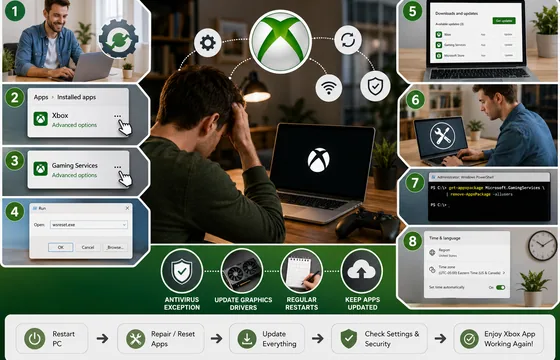
Xbox App Not Working on PC in 2026: 9 Fixes That Actually Work
The good news is that this problem almost always comes down to a small handful of causes: a corrupted background service, an outdated app version, a broken sign-in token, or a Windows update that didn't finish cleanly. None of these require reinstalling Windows. Below is a complete, step-by-step guide to get the Xbox app running again.

Procentive App Review 2026: Features, Pricing, Pros, Cons and Alternatives
The core purpose of Procentive in 2026 is simple: help behavioral health organizations spend less time on admin work and more time with clients. It does this by connecting clinical documentation, scheduling, and billing into a single workflow, so information entered once flows automatically to the next step, whether that's a progress note or an insurance claim.

Best Legitimate APK Sites 2026: Verified & Trusted App Download Platforms
Remember: When choosing between apk sites, prioritize transparency, reputation, and your specific needs. The best apk sites in 2026 are those that respect your privacy, verify their content, and operate with genuine user interests in mind. Your digital freedom is worth protecting. Choose wisely. Choose legitimacy. Choose from our verified best apk sites list.