CDC Coding Tool: A 2026 Guide to Accurate Medical Coding and Billing
Medical billing runs on precision. One wrong digit in a diagnosis code can mean a denied claim, a delayed payment, or a compliance flag during an audit. That's exactly why coders lean on the CDC coding tool and the ICD-10-CM resources behind it instead of guessing or working from memory.
What the CDC Coding Tool Actually Is
The CDC, through the National Center for Health Statistics, maintains the official ICD-10-CM code set used across the United States for diagnosis coding. The CDC coding tool refers to the lookup resources, guideline documents, and reference files built around that code set. Coders use it to confirm the exact code for a diagnosis, check for recent updates, and follow the official coding guidelines that insurance payers expect to see.
Why Accuracy Here Matters So Much
Every claim submitted to an insurer or to Medicare depends on the diagnosis code matching the documented condition. A code that's close but not exact can trigger a rejection, an audit request, or in worse cases, an accusation of improper billing. That's the real cost of skipping a proper coding reference.
Who Relies on This Tool
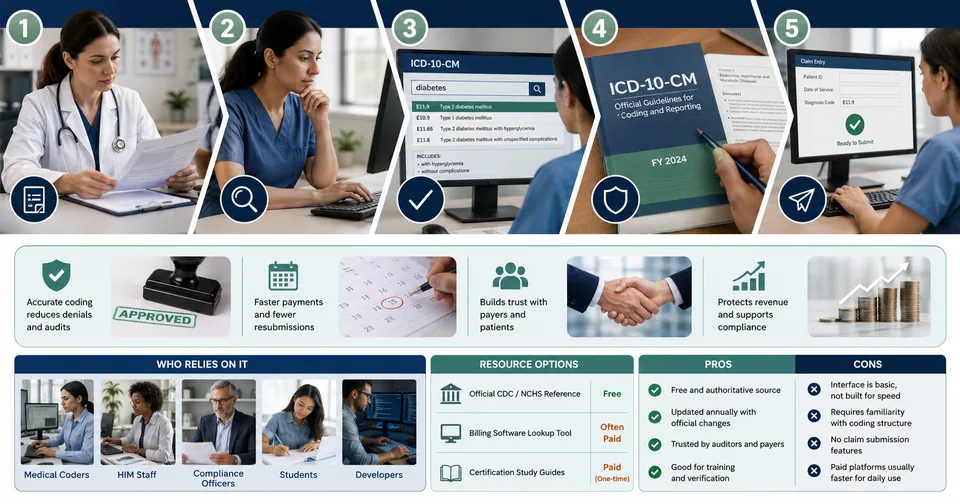
Medical coders working in hospitals, clinics, and billing companies
Health information management (HIM) staff verifying chart documentation
Compliance officers auditing claims before submission
Students and new coders studying for certification exams
Software developers building billing or EHR systems that need current code sets
Core Features Coders Rely On
Searchable index of ICD-10-CM diagnosis codes with full descriptions
Annual updates that reflect new, revised, or retired codes
Official coding guidelines explaining how to apply codes correctly
Cross-references for related or excluded codes to avoid mismatches
Downloadable reference files for offline use in billing software
Price and Access
The core CDC coding resources are free and published for public use, since they're a government reference rather than a commercial product. Many billing software platforms build paid tools on top of this free data, adding search speed, autocomplete, and integration with claim forms. Whether a practice pays for one of those add-on platforms or works directly from the free reference depends on billing volume and budget.
A Typical Coding Workflow
Read the provider's documentation for the visit or procedure carefully.
Identify the primary diagnosis and any secondary conditions that need separate codes.
Search the current ICD-10-CM index for the closest matching term.
Confirm the code against the official guidelines, checking for exclusion notes.
Enter the verified code into the claim and keep a note of the source reference used.
Why Annual Updates Catch People Off Guard
New coders sometimes assume a code they memorized last year is still valid, only to find it was revised or retired in the newest release. The CDC updates ICD-10-CM annually, usually effective October 1st, and even experienced billers get tripped up when a familiar code changes without warning. Checking the current year's file before a busy billing cycle is a habit worth building, not an occasional task.
Example: Avoiding a Denied Claim
Consider a clinic that submits a claim using last year's code for a chronic condition, unaware it was split into two more specific codes in the newest update. The payer flags the claim as invalid, payment is delayed by weeks, and staff have to resubmit with corrected documentation. A five-minute check against the current CDC coding reference before submission would have avoided the entire delay.
Data Point: The Cost of Coding Errors
Industry billing audits consistently point to diagnosis coding errors as one of the most common reasons claims get delayed or denied in the first place. Even a single mismatched digit forces a resubmission cycle that can add weeks to payment timelines. That's the practical reason coding teams treat the reference lookup as a required step rather than an optional double-check, especially in high-volume billing environments where a small error rate still adds up to real revenue lost.
Expert Perspective From Coding Educators
Certified coding instructors often stress the same point to students: memorizing common codes is useful for speed, but it should never replace verifying against the current official reference, especially for anything unusual or newly updated. That habit, built early in training, tends to separate coders who rarely trigger audits from those who run into repeated claim denials.
Comparing Coding Resource Options
Resource Type | Cost | Best For |
|---|---|---|
Official CDC/NCHS reference | Free | Verifying exact codes and guidelines |
Billing software lookup tool | Often paid | High-volume daily coding |
Certification study guides | Paid (one-time) | Students preparing for exams |
Pros and Cons
Pros | Cons |
|---|---|
Free and authoritative source | Interface is basic, not built for speed |
Updated annually with official changes | Requires familiarity with coding structure |
Trusted by auditors and payers | No built-in claim submission features |
Good for training and verification | Paid platforms usually faster for daily use |
How to Use It Without Slowing Down Your Workflow
Bookmark the current year's code set so you're never coding from an outdated version.
Cross-check any code you're unsure about instead of relying on memory.
Keep a note of guideline updates each year — they change more often than people expect.
Combine the reference with your billing software's built-in search for speed and accuracy together.
Building a Reliable Coding Habit
The coders who avoid repeated denials tend to share the same habit: they treat the reference lookup as a required step in every claim, not a fallback for the tricky ones. That discipline is what separates a smooth billing cycle from one full of resubmissions and revenue delays. It's a small extra step per claim that pays for itself many times over across a full billing month.
Looking Ahead: Coding in an AI-Assisted Billing World
More billing software now layers automated suggestions on top of the same official CDC code set, using documentation text to suggest likely codes. That's a genuine time-saver, but it doesn't remove the need to verify against the current official reference, since automated suggestions still need a human check before submission. The tools are getting faster; the underlying responsibility for accuracy hasn't changed.
The CDC coding tool centers on the free, official ICD-10-CM code set and guidelines.
Accuracy directly affects claim approval, so skipping verification is a real financial risk.
Paid billing platforms often layer speed and automation on top of this same free data.
New coders and seasoned billers both benefit from double-checking codes each year.
A Note on Training New Staff
Clinics that train new billing staff well tend to build the CDC reference into onboarding from day one, rather than treating it as something coders discover on their own after a denied claim teaches them the hard way. A short checklist habit, look it up, confirm the guideline, then enter the code, saves months of preventable errors during a new hire's learning curve.
How This Compares Across Practice Sizes
A solo practitioner billing a handful of claims a week can usually work directly from the free CDC reference without much friction, since volume is low enough that manual verification doesn't slow anything down meaningfully. A larger clinic or hospital billing department handling hundreds of claims daily almost always benefits from a paid platform layered on top of that same free data, purely because the search speed and integration with claim forms save enough staff hours to justify the cost. Neither approach changes the underlying source of truth: the same official code set either way.
Getting a diagnosis code right the first time saves everyone a headache later. If your team also handles patient forms and reports alongside coding, the PDF Tools and Text Tools sections can help clean up documentation before it's submitted. Check the About Us page to see how these guides are put together, or browse the FAQs for quick answers to common billing questions. For more on healthcare workflow tools, Read Latest Blogs regularly.
Related posts

Droven.io AI for Business: A Complete Guide to Smarter Business Growth with Artificial Intelligence
AI Chatbot Conversations Archive: Why It Matters in 2026
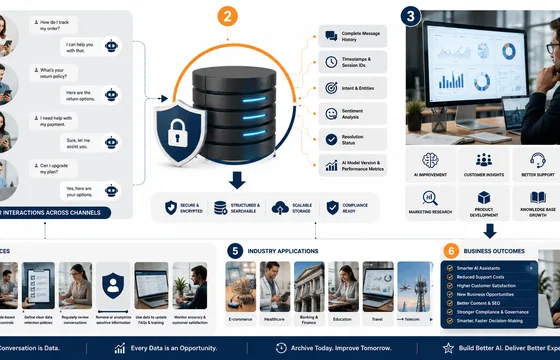
As conversational AI continues to evolve, businesses that invest in structured conversation archiving will be better equipped to understand their customers, optimize operations, and maintain a competitive advantage in an increasingly AI-driven world
Abraham Quiros Villalba AI Tool: Features, Benefits, Use Cases & Everything You Need to Know (2026)
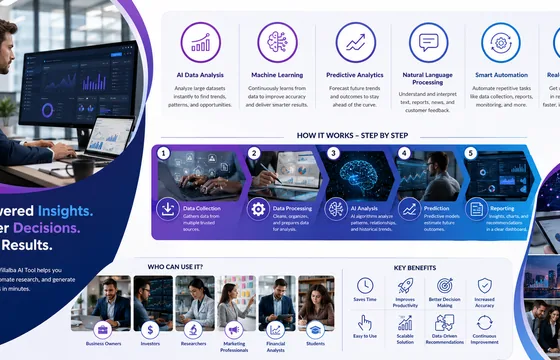
The Abraham Quiros Villalba AI Tool is an AI-powered platform designed to help users analyze complex data, automate research, and generate intelligent insights. It uses modern artificial intelligence technologies such as machine learning, predictive analytics, and natural language processing (NLP) to simplify decision-making across various industries.

AI Transformation Is a Problem of Governance, Not Just Technology
By treating AI transformation as a governance challenge rather than simply a technical upgrade, businesses can reduce risk, improve trust, ensure regulatory compliance, and create sustainable value. In an era where AI increasingly influences critical decisions, strong governance is no longer optional—it is the foundation of successful AI transformation.

IP8 Lookup Tool: The Complete 2026 Guide to Checking Any IP Address
For the overwhelming majority of everyday needs, a free single-address lookup covers it. The line where a paid tier starts making sense is volume: security teams filtering thousands of login attempts, marketing platforms enriching visitor data at scale, or fraud-prevention systems that need automated, real-time lookups built into their pipeline. If you're checking one address a week, there's no reason to pay for anything. If you're checking thousands a day, an API plan will save far more time than it costs.