RadioShack PRO-2096 Software
Admin
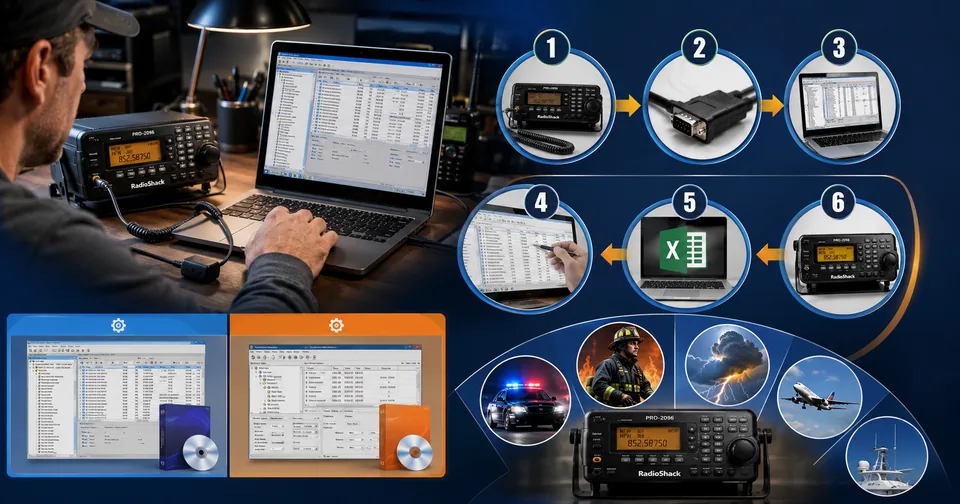
The RadioShack PRO-2096 was one of the more popular digital trunking scanners on the market, especially among hobbyists who wanted to monitor police, fire, and emergency communications. But the scanner's tiny screen and button-based menus make manually entering hundreds of frequencies painfully slow. That's where PRO-2096 software comes in, and picking the right program can save you hours of tedious button-pressing.
Here's a practical look at how PRO-2096 programming software works, the main options available, and what to watch out for before you buy.
What the PRO-2096 Actually Is
The PRO-2096 is the mobile version of RadioShack's PRO-96 digital trunking scanner. It's built around a Virtual Scanner memory system that stores 11 separate memory configurations, each holding 500 channels and 1,500 talkgroups, for a combined total of 5,500 channels and 16,500 talkgroups. It covers most of the bands hobbyists care about, including marine, fire and police, ham radio, CB, VHF air traffic, racing, and weather channels.
Programming all of that by hand through the scanner's built-in menu is realistic for a handful of channels, but nobody wants to manually enter thousands of talkgroups one at a time. That's the entire reason PRO-2096 software exists.
What This Kind Of Software Actually Does
Reads existing channel and talkgroup data straight off the scanner
Lets you edit frequencies, labels, and settings in a proper graphical interface instead of a tiny scanner screen
Writes your changes back to the scanner in one step
Imports and exports data as CSV files, so you can share or back up your setup
Manages the scanner's Virtual Scanner Folders across all 11 memory banks
Supports rebanding, the frequency reallocation process some public safety systems went through
Main Software Options
Software | Developer | Key Notes |
Win96 | StarrSoft | Full-featured, works with both PRO-96 and PRO-2096, includes advanced settings not documented in the manual, but distributed as a 30-day trial and the developer has reportedly been inactive for years, making new license keys hard to obtain |
ARC96 | Butel | Marketed as the cheapest and most user-friendly option for the PRO-96 and PRO-2096, includes a rebanding calculator, and the developer remains active in support forums |
A Word of Caution on Win96
Before choosing software, it's worth knowing that user forums have documented ongoing problems with Win96 specifically. Multiple scanner hobbyists report being unable to obtain a permanent license key after paying, apparently because the software's original author is no longer active or reachable. If you're buying software today rather than reusing an old license you already own, ARC96 currently has a more consistent track record for actually getting what you pay for.
What You'll Need to Get Started
A RadioShack PRO-2096 scanner
A programming cable compatible with the PRO-96 series
A Windows PC running Windows 2000 or later
Your chosen software, either Win96 or ARC96, installed and licensed
The scanner's user manual on hand for reference during setup
Basic Setup Steps
Once you have the cable connected and the software installed, the general workflow looks similar across most PRO-96 series programs. First, connect the scanner to your PC using the programming cable and power on the scanner. Next, open the software and use its read function to pull the scanner's current data into the program. From there, you can edit channels, frequencies, and talkgroup labels directly on your screen, which is far faster than scrolling through menus on the scanner itself.
Once your edits are finished, use the software's write function to send the updated data back to the scanner. Most programs also let you import a CSV file if you're starting from a frequency list someone else has already compiled for your area, which saves you from typing in hundreds of entries by hand.
Where to Find Reference Documents
If you've lost your original manual, the RadioShack PRO-2096 user's manual is archived and available for free download through the Internet Archive, which is useful for checking exact menu steps or backlight and squelch settings that the programming software doesn't cover. Community wikis dedicated to scanner hardware also maintain detailed technical specs, including step sizes for every frequency band the PRO-2096 supports.
If you end up converting scanned pages of an old manual into a searchable document, ToolSimpli's PDF tools can help clean up and merge scanned pages, and the image tools section is useful if you need to sharpen or resize screenshots from the scanner's display for reference.
Troubleshooting Common Setup Problems
Most PRO-2096 programming headaches trace back to one of three things: the wrong cable, an outdated driver, or a permissions issue with the connection port. The PRO-96 series needs a specific programming cable, and not every generic cable sold online is wired correctly for this model, so it's worth buying from a seller that explicitly lists PRO-96 or PRO-2096 compatibility rather than assuming a similar-looking cable will work.
If the software can't detect the scanner at all, check that the correct communication port is selected in the program's settings, and confirm the scanner is powered on and not already in an active scanning mode when you attempt to connect. Older laptops without a built-in serial port may also need a USB-to-serial adapter, which can introduce its own driver issues on newer versions of Windows.
Building a Frequency List From Scratch
If you're setting up a PRO-2096 for a new area rather than importing an existing configuration, start by identifying the trunked radio systems active near you, along with their control channel frequencies and site identifiers. Local scanner enthusiast communities and hobbyist forums often maintain up-to-date frequency lists for specific counties or metro areas, which can save enormous amounts of manual research.
Once you have a frequency list, most programming software lets you import it as a CSV file rather than typing every entry by hand. From there, organize your talkgroups into logical banks, for example separating police, fire, and public works onto different virtual scanner folders, so you can quickly switch between what you're monitoring without wading through unrelated channels.
Is It Worth Buying Software At All
For a handful of channels, manual programming through the scanner's buttons is fine. But if you're trying to monitor a full local trunked radio system with hundreds of talkgroups, or you want to keep several memory banks organized for different situations, PRO-2096 software pays for itself quickly in saved time. Just go in with realistic expectations about licensing: check current forum activity before purchasing, since availability and support for scanner programming tools can change depending on whether the original developer is still active.
Between the two main options, ARC96 currently has the more reliable reputation for licensing and ongoing support, while Win96 remains a capable program for anyone who already owns a working license. Either way, having dedicated software turns a tedious, error-prone manual process into something you can finish in a few minutes.
Related posts
Recovery Home Management Software: What It Is and Why Your Facility Needs It
At its core, this type of software centralizes everything related to running a recovery home. Instead of keeping resident files in one place, payment records in another, and compliance documents in a folder on someone’s desktop, everything lives in one system your whole team can access.

Common Account Audit Software Used in Kenya: A Practical Overview
Before naming specific tools, it helps to understand the different categories, since most firms end up using more than one type together.
WhiteSnow Software: Who They Are and What They Actually Do
WhiteSnow Software is a real, established software consultancy with over a decade in the industry and a genuine product — Axonator — that it has continued to develop and support. Like any vendor, the right move is to verify current details directly with the company, request references, and compare their offering against your specific project needs rather than relying solely on any single source, including this one.
Wolf3D Software: The Company Behind Ready Player Me’s 3D Avatars
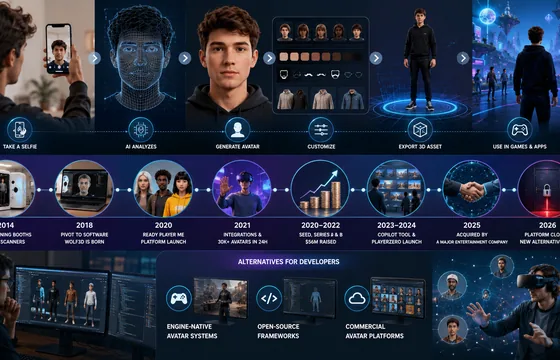
The Wolf3D story is a useful case study for anyone building software in a fast-moving space like the metaverse or 3D avatar tools. A hardware-first idea pivoted into a software product, found real traction by solving a genuine developer pain point, and eventually became valuable enough to attract a major acquisition. It’s also a reminder that platforms you build on top of can shift quickly, so keeping your project’s assets portable and documentation organized is worth the extra effort.
BestOutcome PPM Software Company Overview
BestOutcome has built a long track record in the PPM space, particularly among public sector and healthcare organizations that need rigorous governance and reporting. For organizations already juggling multiple projects and struggling to get a clear, current picture of progress, PM3 is a serious option worth including in any shortlist. For smaller teams running one or two projects, though, a lighter tool is probably the better starting point.